2. Tools
This section describes the tools use to run, report and analyze OpenFPGA, Yosys and VPR results, as presented in Fig. 2.1. These enable an easier
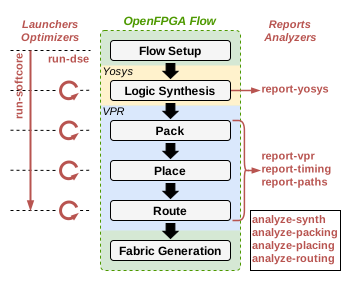
Fig. 2.1 OpenFPGA-Softcores available tools.
2.1. run-softcore
Basic Usage
This tool runs a single soft-core benchmark simulation with the platform using a given FPGA architecture, using the following command:
run-softcore <soft-core> <architecture>
where:
- <soft-core>
Soft-core processor to evaluate.
- <architecture>
FPGA architecture to evaluate, using any files in the fpga_archs/ dir.
Note
This script use directly the OpenFPGA framework, then the OPENFPGA_PATH environment variable need to be exported.
Just source the project setup_env.sh script to fix that error.
Optional Arguments
- --device-layout {<width>x<height>, auto}
Define a fixed FPGA layout dimensions.
Default:
auto
- --channel-width {<int>, auto}
Define a fixed FPGA channel width.
Default:
auto
- --cache-size <int>
Define the memory size (L1) of the core in bytes.
Default:
1024
- --isa {i, im, ima}
Enable RISC-V ISA extensions.
i: base integer instruction set,m: enable the multiplier/divider instruction extension,c: enable the compressed instruction extension.
Default:
i
- --abc-command {abc, abc9}
ABC executable used to evaluate different mapping strategies.
Default:
abc9
- --lut-max-width {<width>, <w1>:<w2>, auto}
ABC LUT mapping using a specified (max) LUT width. The
autooption will always take the largest LUT size available in the XML architecture.Default:
auto
- --run-tests <csv-filename>
run multiple simulations listed in a CSV file, giving all arguments by columns
Default: None
- --run-dir <path>
Save all OpenFPGA outputs in a given directory
Default:
run_dir/
2.2. run-dse
Note
This tool is not developed as of today.
It will aim to complement the run-softcore tool by running simulations with different FPGA architectures without duplicating simulation steps, such as synthesis, packing, placing and routing when it is necessary.
2.3. report-yosys-vpr
Basic Usage
This tool parses Yosys and VPR result files generated by the OpenFPGA framework, and generate a CSV file, using the following command:
report-yosys-vpr <search-path>
- <search-path>
Specify a base directory to search reports (multiple directories could be specified).
Default:
run_dir/latest
Optional Arguments
- -o <csv-file>, --output <csv-file>
Save results in a CSV format.
Default:
outputs/report_parser.csv
2.4. report-place-timing
Basic Usage
This tool parses the timing report (setup, hold or pre-pack) generated by OpenFPGA framework and extend the description for each point of the path (block type, block ID, block coordinates, …) using .net and .place reports.
The generated output file is a report file, following the report timing file standards, using the following command:
report-place-timing <search-path>
- <search-path>
Specify a base directory to search reports (multiple directories could be specified).
Optional Arguments
- -p <path-id>, --path-id <path-id>
Define the path number to print.
Default:
0
- --hold
Parse the hold report timing file.
- --pre-pack
Parse the pre-pack report timing file.
- --post-place
Parse the post-place report timing file.
- -o <rpt-file>, --output <rpt-file>
Analyze all paths and save them in a RPT format.
2.5. report-route-paths
Basic Usage
This tool parses the timing report (setup, hold or pre-pack) generated by OpenFPGA framework and extend the description for every start and end points of the path, adding basic metrics for a more complete analysis, RTL to physical routing. The generated output file is a CSV file having a single line per path, using the following command:
report-route-paths <search-path>
- <search-path>
Specify a base directory to search reports (multiple directories could be specified).
Optional Arguments
- -p <path-id>, --path-id <path-id>
Define the path number to print.
Default:
0
- --hold
Parse the hold report timing file.
- --pre-pack
Parse the pre-pack report timing file.
- --post-place
Parse the post-place report timing file.
- -o <rpt-file>, --output <rpt-file>
Analyze all paths and save them in a CSV format.